













Wild Fortune Casino: Mobile Experience and Device Support
Wild Fortune Casino Mobile Experience: No App Download Required
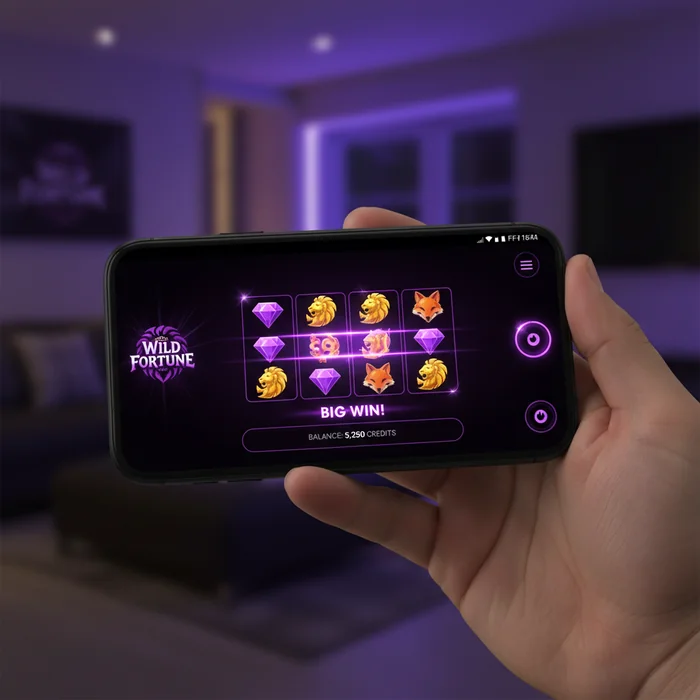
Wild Fortune Casino's mobile platform is built entirely around your browser — meaning you can open your phone right now, navigate to the site, and be spinning reels or sitting at a live dealer table within 60 seconds, no installation required. That's not a workaround. That's a deliberate design choice. We've engineered the platform so that the browser is the app, and for most players, that turns out to be a genuine advantage rather than a compromise.
There's no Wild Fortune Casino app available on the Apple App Store or Google Play Store at this time, and we want to be upfront about that. What we've built instead is a fully responsive web experience that adapts to your screen size, touch input, and connection speed automatically. Whether you're on an iPhone 14 or a mid-range Android device, the interface scales cleanly without the friction of downloading, updating, or managing storage space on your device.
How the Browser-Based Platform Works on iOS and Android
On iOS, opening Wild Fortune Casino in Safari gives you access to the full platform — account login, game library, banking, and live support — with no additional steps. Safari on iOS 15 and above handles the WebGL rendering that our slot animations and live dealer streams depend on, so you're not sacrificing visual quality. You can also tap Share → Add to Home Screen to pin a shortcut icon directly to your iPhone or iPad home screen, which behaves almost identically to a native app icon.
Android users get the same experience through Chrome, which is pre-installed on virtually every Android device running version 8.0 or later. Chrome's Progressive Web App support means the site can cache key assets locally, which noticeably reduces reload times when you return to the platform after a short break. The "Add to Home Screen" prompt often appears automatically in Chrome on Android, making setup feel seamless even for players who've never used a browser-based casino before.
One honest limitation worth flagging: because we're browser-based, push notifications work differently than they would through a native app. On Android via Chrome, you can opt in to browser push notifications and receive alerts about promotions or account activity. On iOS, push notifications through Safari are supported from iOS 16.4 onward — older iPhones may not receive them. We think that's a fair trade-off given the zero-download convenience, but it's worth knowing before you rely on notification alerts.
Comparing Mobile Browser Performance to a Native App
The honest comparison: a purpose-built native app typically has a slight edge in raw launch speed and offline caching depth. That's just the reality of compiled code versus a browser runtime. Where our browser platform closes the gap is in update delivery — when we add new games or adjust the interface, you see those changes immediately on your next visit, with no App Store approval delay and no "please update your app" interruption mid-session.
On a 4G connection, our game lobby loads in approximately 3–5 seconds. On 5G, that drops to under 2 seconds for returning visitors whose browsers have cached the core assets. Live dealer streams — which are the most data-intensive experience on the platform — run smoothly at around 720p on a stable 4G signal, stepping up to 1080p on 5G or Wi-Fi. Slots and table games are considerably lighter and load in 1–3 seconds on 4G without any perceptible quality reduction.
Accessing All 7,500+ Games Directly From Your Mobile Browser
Every one of the 7,500+ titles in our library is accessible from your mobile browser — the same count you'd find on desktop, with no separate "mobile version" of the game catalogue. That parity matters. Some platforms quietly reduce their mobile library to a curated subset; we've made sure that doesn't happen here. Whether you're after a specific Pragmatic Play slot or a live baccarat table from Evolution Gaming, your phone gets you there.
Slots and Live Dealer Tables Optimized for Small Screens
Slot games are naturally well-suited to portrait mode on a phone screen — the reels stack vertically, the spin button sits at the bottom within thumb reach, and the paytable is accessible via a single tap rather than a hover menu. Titles like Gates of Olympus, Sweet Bonanza, and Big Bass Bonanza — three of the most-played slots on our platform — have been built by their providers with mobile-first layouts, so they genuinely feel designed for a 6-inch screen rather than shrunk down from a desktop version.
Live dealer tables present a different challenge on mobile, and we'll be direct about it: landscape mode is strongly recommended for live blackjack, roulette, and baccarat. In portrait mode, the dealer camera feed is compressed to accommodate the betting grid, which can make reading the table feel cramped on phones smaller than 6 inches. Flip to landscape and the experience opens up considerably — the video feed takes up the top half of the screen, controls sit cleanly at the bottom, and chat remains accessible via a collapsible panel.
Table games like standard blackjack, video poker, and roulette (non-live) are optimized for both orientations and tend to be the smoothest mobile experience in the catalogue. If you're commuting on a bus with one hand free, these are the formats where touch controls feel most natural and sessions can be paused and resumed without disrupting a live stream.
Game Loading Speed and Graphics Quality on Mobile
We've worked with our game providers to ensure that mobile-delivered game files are compressed without visible quality loss. Most slots load their initial assets in under 3 seconds on a 4G connection — that's the game shell, reels, and core animations. Secondary assets like bonus round sequences load progressively in the background, so you're not waiting for the full game to buffer before you can spin.
Graphics quality on mobile is provider-dependent, but the majority of titles in our 7,500+ library render at full resolution on screens up to 1080p, which covers most modern smartphones. Where you'll notice a difference is on older devices with limited GPU memory — some of the more visually complex 3D slots may drop to a lower animation frame rate to maintain playability. That's a device hardware constraint rather than a platform limitation, and it affects a small minority of our catalogue.
Making Deposits and Withdrawals via Mobile at Wild Fortune Casino
The full banking suite is available through the mobile browser — deposits, withdrawals, transaction history, and limit management all sit within the same responsive interface you use to play. There's no "desktop required" step in the payment flow, which matters when you want to top up your balance between games without switching devices.
Using Bitcoin, Ethereum, and USDT From a Mobile Device
Cryptocurrency deposits are genuinely well-suited to mobile. If you hold Bitcoin, Ethereum, or USDT in a mobile wallet app — Coinbase, Trust Wallet, MetaMask, or similar — the process is straightforward: navigate to the deposit section in your Wild Fortune Casino account, select your cryptocurrency, copy the wallet address or scan the QR code directly from your wallet app, and confirm the transaction. The QR code scanner integration is particularly smooth on mobile since your phone's camera is already in hand.
Crypto withdrawals typically process within a few hours on our end, which is meaningfully faster than the 1–5 business days standard for bank transfers across the industry. There are no withdrawal fees charged by Wild Fortune Casino on cryptocurrency transactions, though standard network gas fees apply on the blockchain side — these vary by network congestion and are outside our control. For USDT specifically, choosing the TRC-20 network over ERC-20 typically results in lower gas fees, which is worth knowing if you're making frequent smaller withdrawals.
One honest constraint: crypto transactions are irreversible once confirmed on-chain. We recommend double-checking wallet addresses on mobile before confirming, since typing errors on a small keyboard are more likely than on desktop. The QR code route eliminates this risk entirely.
Completing Bank Transfer and Card Payments on Mobile
Credit and debit card deposits work through a standard payment form in the mobile browser — card number, expiry, CVV, and billing details. Most modern mobile browsers offer autofill for saved card details, which reduces the typing burden significantly. 3D Secure authentication, where required by your bank, redirects you to your bank's verification page and returns you to Wild Fortune Casino automatically after approval.
Bank transfers are available for both deposits and withdrawals, with processing times in the 1–5 business day range depending on your bank and jurisdiction. This is an industry-standard timeframe rather than a Wild Fortune-specific delay — the variance comes from correspondent banking chains rather than our processing. If speed is a priority, cryptocurrency withdrawals are the faster route by a significant margin.
| Payment Method | Mobile Availability | Deposit Speed | Withdrawal Speed | Fees (Wild Fortune side) |
|---|---|---|---|---|
| Bitcoin | Full (QR + address) | After blockchain confirmation | Often within hours | None (network fees apply) |
| Ethereum | Full (QR + address) | After blockchain confirmation | Often within hours | None (gas fees apply) |
| USDT | Full (QR + address) | After blockchain confirmation | Often within hours | None (TRC-20 recommended) |
| Credit/Debit Card | Full (autofill supported) | Instant | 1–5 business days | None |
| Bank Transfer | Full | 1–3 business days | 1–5 business days | None (bank fees may apply) |
Mobile Account Management and 24/7 Support Access
Managing your Wild Fortune Casino account from a phone is designed to be as complete as the desktop experience. Every account function — personal details, responsible gambling limits, bonus tracking, transaction history, and verification document uploads — is accessible through the mobile browser without needing to switch to a larger screen. We've structured the account menu with mobile navigation in mind, using collapsible sections and large tap targets rather than dense dropdown menus.
Updating Account Details and Limits Through Mobile Browser
Deposit limits, session time limits, and self-exclusion options are all reachable from the responsible gambling section of your account settings on mobile. These tools are available 24/7 and take effect immediately for restrictive changes — if you lower your daily deposit limit, that limit applies from the moment you save it, not after a cooling-off period. Increases to limits, by contrast, involve a short processing delay as a responsible gambling safeguard, which is consistent with Curaçao Gaming Control Board licensing standards.
Document verification — required for withdrawal processing — can be completed entirely on mobile. The ID upload function accepts photos taken directly with your phone's camera or files from your photo library. Accepted formats include JPEG and PDF, and the upload interface works in both Safari and Chrome without requiring a separate app. If you're uploading a passport or utility bill for the first time, doing it from your phone is often faster than scanning on desktop since your camera is already the most convenient capture tool available.
One area where mobile has a minor limitation: reviewing detailed transaction histories with many entries can feel slightly cramped on a phone screen due to the table layout. The data is all there — every deposit, withdrawal, and bonus transaction — but scrolling through a long history is more comfortable on a tablet or desktop. For quick balance checks and recent transaction reviews, mobile is perfectly adequate.
Reaching Wild Fortune Casino Live Chat Support From Your Phone
Our live chat support runs 24 hours a day, 7 days a week, and is fully accessible from the mobile browser. The chat widget sits in the bottom-right corner of every page and opens as an overlay rather than a new tab, so you don't lose your place in the game lobby or your active session. Response times vary by time of day, but the live chat channel is staffed around the clock — you're not waiting for business hours to get help with a deposit issue or a bonus query.
For players using Wild Fortune Casino on mobile for the first time, live chat is the fastest route to resolving account setup questions. Agents can guide you through the verification process, explain bonus terms, and escalate payment queries — all within the same browser session where you're playing. There's no phone number support or dedicated mobile support line, which is a limitation worth noting if you prefer voice communication, but the live chat response quality covers the practical needs of most support interactions.
If you're a new player ready to explore everything the platform offers from your phone, create your Wild Fortune account here — the signup process takes under 3 minutes on mobile and puts you one step away from the full 7,500+ game library. Already have an account? Log in from your mobile browser and pick up exactly where you left off. Wild Fortune Casino is built for the way people actually play in 2026 — in short sessions, on the move, with a phone in hand rather than a desktop in reach.
Frequently Asked Questions
Is there a Wild Fortune casino app I can download on my phone?
Wild Fortune does not require a dedicated downloadable app for iOS or Android devices. Instead, the casino uses browser-based mobile compatibility, meaning you can access all 7,500+ games directly through your smartphone or tablet browser without taking up any storage space on your device. Simply visit wildfortunecasino777.com on your mobile browser and the site adapts automatically to your screen.
Does Wild Fortune work on both iPhone and Android devices?
Yes, Wild Fortune is compatible with both iOS and Android devices through its browser-based mobile platform. Whether you are using Safari on an iPhone, Chrome on an Android phone, or any modern mobile browser, the casino loads smoothly without needing to download anything from the App Store or Google Play. This also means there are no version update delays — you always access the latest version of the site instantly.
Can I play all 7,500 games on mobile at Wild Fortune?
The full library of 7,500+ games at Wild Fortune, including slots, table games, and live dealer titles, is accessible through the mobile browser experience. Game performance is optimised for touchscreen play, so spinning reels, placing bets, and interacting with live dealers all work seamlessly on smaller screens. There is no reduced game selection compared to the desktop version.
Can I make deposits and withdrawals through the Wild Fortune mobile site?
All payment methods available on desktop are fully functional through the Wild Fortune mobile browser, including Bitcoin, Ethereum, USDT, Bank Transfer, and Credit or Debit Cards. Cryptocurrency withdrawals are often processed within hours, making mobile crypto transactions especially convenient for players on the go. You can manage your entire account, from depositing to withdrawing, without ever switching to a desktop device.
Will I still get the welcome bonus if I sign up through mobile at Wild Fortune?
Signing up and depositing through the Wild Fortune mobile browser qualifies you for the same welcome offer available on desktop, which includes up to $300 plus 175 Free Spins spread across multiple deposits. There is no difference in bonus eligibility whether you access the casino on a phone, tablet, or computer. If you have any questions during the process, Wild Fortune's 24/7 live chat support is also accessible directly from your mobile browser.